Formal Attire Editor
Upload one photo, pick a suit, tuxedo or gown in one of six colors, and the formal attire editor dresses you in it. Your first image is free, no sign-up.
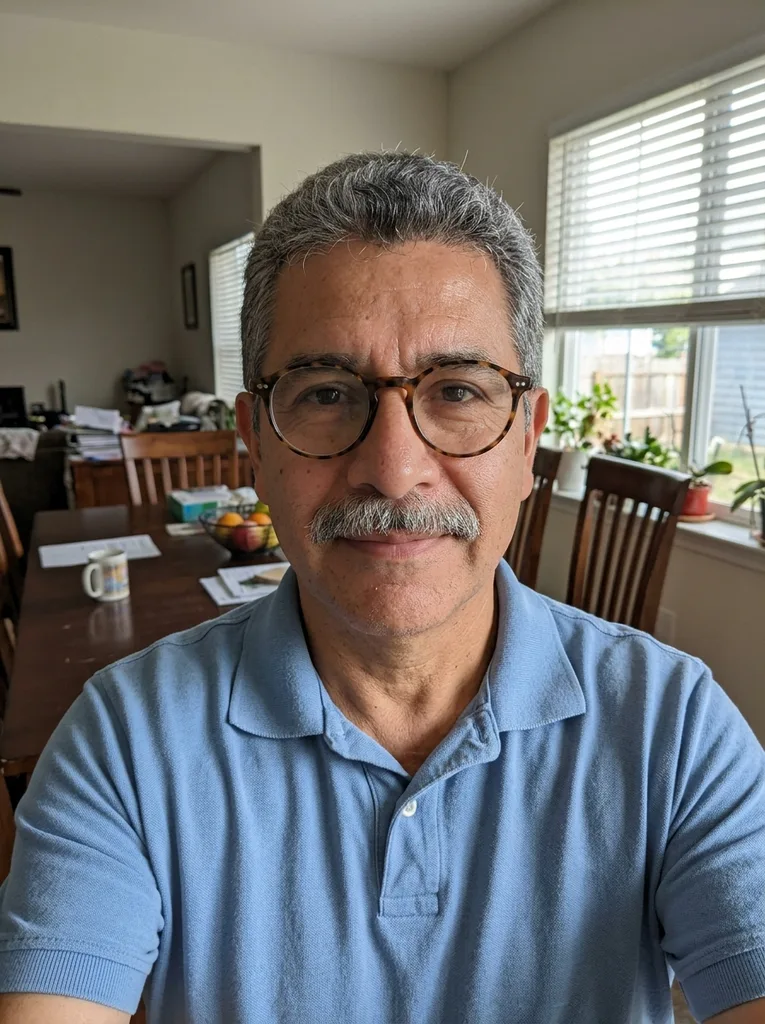 Before
 After
Example result. Upload your photo to make yours.
Examples
BeforeAfterWhat the formal attire editor changes in your photo
Upload a photo of yourself in everyday clothes and the formal attire editor redraws the outfit. Pick one of six attire presets: Suit & Tie, Suit, No Tie, Women's Suit, Dress Shirt, Tuxedo or Evening Gown. Then pick a color: Navy, Charcoal, Black, Light Grey, Beige or Burgundy. The color goes on the main garment, so the jacket, blazer or gown takes it, and with Dress Shirt the shirt itself does.
The model is told to keep your face, expression, skin tone, hairstyle, build and pose, plus the framing and the light on your face. In our test, a man in a blue polo and glasses came back in a navy suit, shirt and tie, with his glasses and his background kept. It is AI output, so compare it with your original before you use it.
Background is set to Keep by default. White, Blue and Grey replace it with a plain backdrop instead. Each run makes one 3:4 portrait.
Made for
- Job seekers
- LinkedIn users
- Freelancers
- Team page editors
- Event guests
Formal attire editor vs a photographer or a new suit
Three ways to get a photo of yourself in formal clothes, compared by type.
| This formal attire editor | Booking a photographer | Renting or buying a suit | |
|---|---|---|---|
| What you need | One photo you already have | A booked session and a trip to it | A suit that fits, plus someone to take the photo |
| Cost | First image free, no paid plan after it | A session fee | A rental or purchase price |
| The clothes | AI-drawn: 6 attire presets in 6 colors | Whatever you wear to the session | The real suit you chose |
| Background | Keep yours, or White, Blue or Grey | Whatever the studio or location has | Wherever the photo is taken |
| What you get | One 3:4 AI image to check against your original | Real photos of you | A real photo in real clothes |
| Official ID photos | No ID photo rules are checked | Ask whether the studio follows the rules you need | The photo still has to meet the rules |
| Something to wear | No, it is only an image | Only your own clothes | Yes, if you bought it |
Where a suited-up photo gets used
Places that ask for a photo of you looking ready for work, and how to set the formal attire editor for each.
LinkedIn profile photo
Start from a clear casual photo and set the formal attire editor to Suit & Tie for a classic business look, or Suit, No Tie for the open-collar version. Check that the result still looks like you before it goes on your profile.
CV and resume photos
Some CVs carry a small photo at the top. Dress Shirt or Women's Suit in Navy or Charcoal keeps it plain and office-ready. Crop the 3:4 portrait to whatever size your template uses.
Profile pictures
Freelance marketplaces, work chat apps and email signatures show a small round avatar. Keep your face centered in the original so a tight circle crop still shows the collar and tie.
Staff and team pages
Team photos often arrive in different clothes from different places. Each person can make their own image with the same Attire and Color picks, keeping their background or choosing a plain Grey one.
Speaker and author bios
Conference programs, podcast pages and author profiles ask for a headshot beside your bio. A formal attire editor photo gives you one without planning a shoot around it.
Previewing a black-tie look
Before a gala or a black-tie dinner, see yourself in Tuxedo or Evening Gown in Black or Burgundy. It shows a style, not a garment to buy: the tool has no sizes, shops or fit advice.