
AI Virtual Try On Wedding Veil Photo
AI virtual try on wedding veil photo: see yourself in a wedding dress and veil, or a veil alone. Your first image is free, no sign-up.
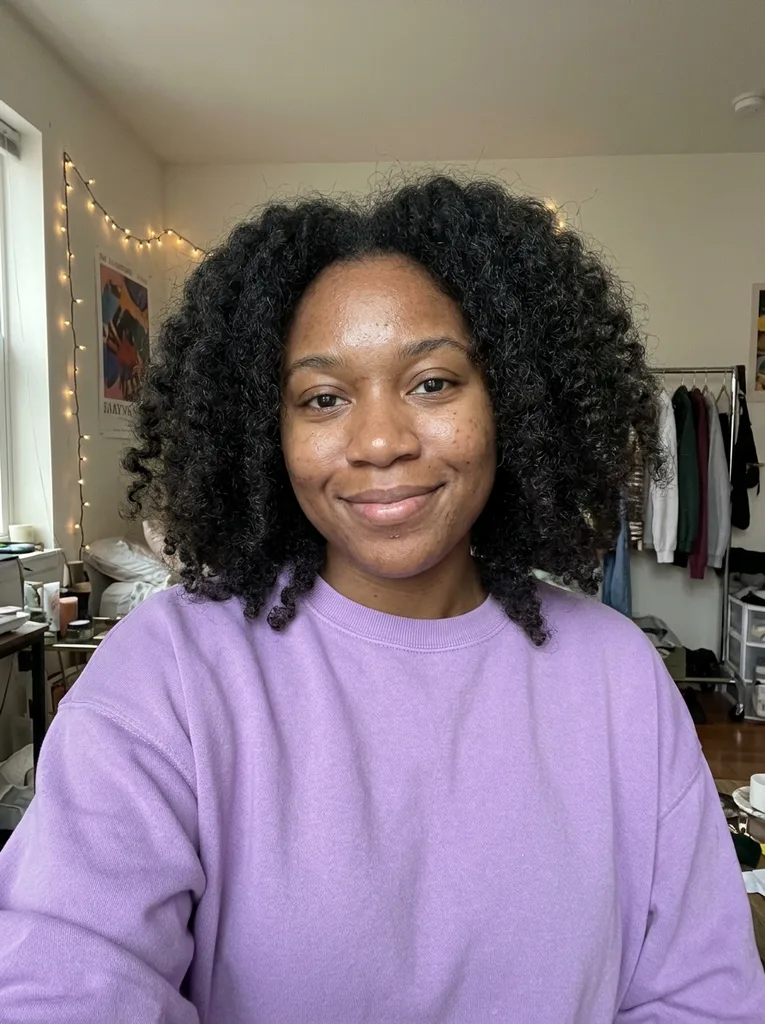 Before
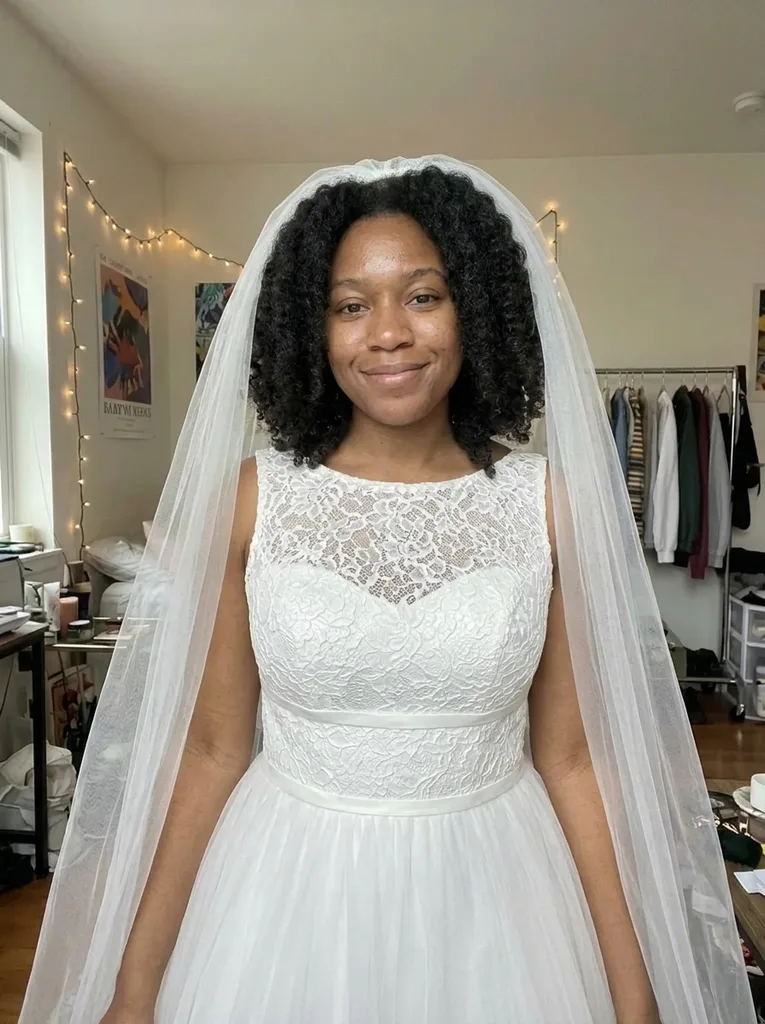 After
Example result. Upload your photo to make yours.
A bridal veil try on and wedding dress try on in one
Upload one photo of yourself and the AI turns it into a bridal picture of you. With Dress + Veil it changes your clothes to a white wedding gown and adds a veil. With Veil Only it adds a veil and is told to leave your own clothes as they are.
You choose from six gown styles, five veil styles and four hair options, and one run gives one image of that combination. It is a quick look at an idea before a boutique appointment or an at-home sample order, not a fitting.
This is not a bridal shop. There are no dresses to buy, no sizes and no prices, and the tool knows nothing about your measurements. Think of the result as a picture to talk about with the people helping you choose.
Made for
- Brides before a boutique visit
- Choosing a veil for a dress you own
- Comparing gown styles
- Testing hair with a veil
- Planning with family or friends
Six styles for a virtual wedding dress try on
Dress Style decides the gown when Try On is set to Dress + Veil. A-Line, the default, asks for a fitted lace bodice with a defined waist and a flowing tulle skirt. Mermaid is fitted through the body and flares at the knee. Ball Gown has a structured bodice and a full skirt. Sheath is smooth satin in a straight, simple line.
Long Sleeve asks for sheer-lace sleeves over an opaque lining. Boho is soft lace with flutter sleeves.
Every gown is asked to be white or ivory and modest: the bodice covers the chest, with no strapless, plunging or see-through neckline. With Veil Only, Dress Style is ignored and only the veil and hair options apply.
Five veils and four hairstyles to try on a wedding veil
Cathedral, the default, asks for a long veil that falls far past the shoulders. Fingertip asks for a fingertip-length veil. Birdcage is short netting over the top of the face with the eyes still visible. Two-Tier has a short top layer and a longer back layer. Lace Edge is a long veil with a delicate lace border.
The veil is described as sheer tulle with natural folds, and apart from the birdcage netting it is told never to cover the face.
Hair sets where the veil sits. Keep Mine keeps your hairstyle and attaches the veil at the crown. Updo, Hair Down and Half Up restyle your own hair, same color and length, with the veil pinned to match. Some guides say long veils suit long aisles and short ones suit city hall; the tool doesn't use those rules, you pick.
Does an AI virtual try on wedding veil photo still look like you?
The model is told to keep your face, expression, skin tone, body shape and pose, and the background. Unlike most pages on this site, it may change the framing: the shot is widened so more of the dress shows. Your hairstyle is kept with Keep Mine and restyled with the other Hair options.
In our test, a woman in her mid 20s with curly hair used the defaults: Dress + Veil, A-Line, Cathedral and Keep Mine. She got a sleeveless white A-line gown with a high lace neckline and a long, sheer cathedral veil, with her curls and face kept and the frame wider than her original.
That is one test, not a promise. The image is AI output, so compare it with your original before you share it.
How to try on a wedding dress and veil on your photo
No text to type: four groups of buttons, one choice in each, and one image per run.
- 1
Upload one photo of you
Use a JPG, PNG or WebP under 10 MB with one person facing the camera, waist up or full body. A phone HEIC photo is converted in the browser first.
- 2
Pick Try On, Dress Style, Veil and Hair
Dress + Veil, A-Line, Cathedral and Keep Mine are preselected. Change any of them before you run, since one run shows one combination.
- 3
Generate, compare and download
Your AI virtual try on wedding veil photo appears next to the original with a Download button. Check the face, the hairline under the veil and the neckline before you save it.
Photo checklist for a wedding dress try on
A better photo gives the AI virtual try on wedding veil photo more to work with.
- Use a photo with one person only, facing the camera, so the gown and veil go on the right body.
- Choose a full-body shot when you want to see the dress shape; a waist-up photo is enough for a veil.
- Keep your hair visible and out of your hands, because the veil is attached at the crown or pinned into it.
- With Keep Mine, upload a photo with your hair the way you plan to wear it, since that hairstyle is kept.
- Pick a photo in good, even light so the white of the gown and the sheer veil have something to show.
- For Veil Only, wear the outfit you want to see with the veil, such as a dress you already own.
- Upload only photos of yourself or of an adult who has agreed; photos of anyone under 18 are not allowed.